
 APMG
APMG
Difference Between Animation and Transition Explained | MAAC Edu
Animation and transition are both essential visual techniques used in design, video editing, and digital content creation, but they serve different purposes. Animation focuses on creating movement within elements such as characters, text, or objects, while transitions are used to smoothly shift from one scene or slide to another. Understanding this difference is crucial for building professional-quality visuals. With training from MAAC, learners can master both animation and transition techniques using industry-standard tools, helping them build strong creative skills and pursue successful careers in animation, video editing, and motion graphics.
If you’ve ever worked with videos, presentations, websites, or design tools, you’ve probably come across the terms animation and transition. At first glance, they might seem similar—both involve movement and visual effects. But in reality, they serve completely different purposes.
Understanding the difference between animation and transition is crucial, especially if you’re planning to build a career in animation, motion graphics, or digital design. With proper training from institutes like MAAC, you can master both concepts and use them effectively in real-world projects.
Let’s break it down in a simple and practical way.
What is Animation?
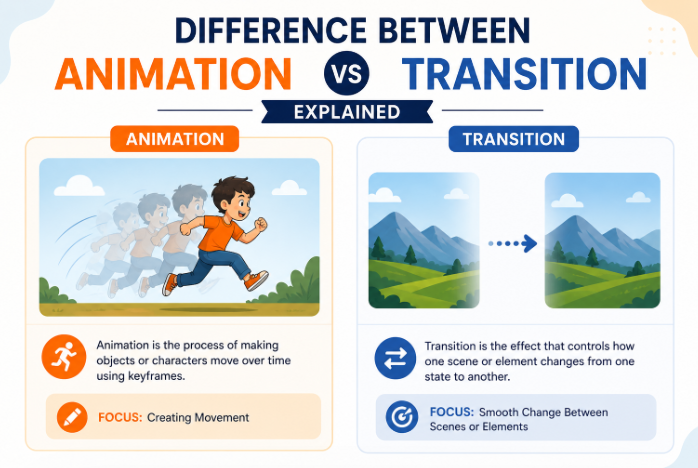
Animation is the process of bringing objects, characters, or elements to life by creating movement. It involves changing properties like position, size, shape, or opacity over time.
In simple terms, animation is what makes things move.
Examples of Animation
- A character walking in a cartoon
- A bouncing ball
- Text appearing letter by letter
- A logo rotating or scaling
Animation is widely used in:
- Films and cartoons
- Video games
- Advertisements
- Social media content
- Explainer videos
At MAAC, students learn how to create smooth, realistic animations using industry tools and techniques.
What is Transition?
A transition, on the other hand, is used to move from one scene, slide, or state to another.
It’s not about animating an object—it’s about connecting two different visuals.
Examples of Transition
- Fade from one slide to another
- Swipe between two screens
- Dissolve between video clips
- Zoom from one scene to the next
Transitions are commonly used in:
- Video editing
- PowerPoint presentations
- Website navigation
- UI/UX design
Think of transitions as the bridge between two pieces of content.
Key Difference Between Animation and Transition
Let’s simplify it:
- Animation = Movement of elements within a scene
- Transition = Movement between scenes
Animation focuses on what happens inside, while transition focuses on how you move to the next.
Detailed Comparison
1. Purpose
- Animation: Adds life and motion to objects
- Transition: Connects one scene or slide to another
2. Usage
- Animation: Used within a single frame or scene
- Transition: Used between two frames or scenes
3. Complexity
- Animation: Can be complex and detailed
- Transition: Usually simple and quick
4. Examples
- Animation: Character movement, object motion
- Transition: Fade, slide, wipe effects
5. Tools Used
Both animation and transition can be created using tools like:
- Adobe After Effects
- Premiere Pro
- Blender
- Animation software
At MAAC, students get hands-on training in these tools to understand both concepts practically.
Why Understanding This Difference Matters
If you’re serious about building a career in animation or design, this distinction is important.
Here’s why:
Better Creative Control
Knowing when to use animation vs transition helps you create more professional content.
Improved Storytelling
Animations bring life to your story, while transitions ensure smooth flow.
Industry Relevance
Professionals are expected to understand both concepts clearly.
At MAAC, students are trained to apply these concepts in real-world projects.
Real-World Examples
Let’s make this even clearer.
Example 1: YouTube Video
- Animation: Text popping up, icons moving
- Transition: Cut or fade between scenes
Example 2: Presentation
- Animation: Bullet points appearing one by one
- Transition: Slide changing from one to another
Example 3: Mobile App
- Animation: Button hover effect
- Transition: Screen switching
Once you understand this, your work instantly looks more polished.
Animation vs Transition in Digital Marketing
In digital marketing, both play an important role.
Animation Helps In:
- Grabbing attention
- Explaining concepts
- Increasing engagement
Transition Helps In:
- Smooth content flow
- Professional video editing
- Better user experience
That’s why skilled professionals who understand both are highly valued.
Skills You Need to Master Animation and Transition
To work professionally, you need:
Creative Skills
- Visual storytelling
- Design sense
- Creativity
Technical Skills
- Software knowledge
- Timing and motion understanding
- Editing skills
Practical Skills
- Project execution
- Portfolio building
- Real-world application
At MAAC, all these skills are developed through structured training programs.
Tools You Will Learn at MAAC
At MAAC, students get hands-on training on industry tools such as:
- Adobe After Effects
- Adobe Premiere Pro
- Photoshop
- Animation software
These tools help you create both animations and transitions effectively.
Career Opportunities After Learning Animation
Once you master animation and transitions, multiple career paths open up.
You can become:
- Animator
- Motion Graphics Artist
- Video Editor
- UI/UX Designer
- Content Creator
Industries include:
- Film and entertainment
- Advertising agencies
- Gaming companies
- Digital marketing agencies
- OTT platforms
Salary Expectations in India
- Freshers: ₹2.5 – ₹4 LPA
- Mid-level: ₹4 – ₹8 LPA
- Experienced: ₹8+ LPA
- Freelancers: Unlimited
Your growth depends on your skills and creativity.
Why Choose MAAC Edu?
When it comes to animation training, MAAC is one of the most trusted names in India.
Here’s what makes it stand out:
- Industry-oriented curriculum
- Hands-on practical training
- Experienced faculty
- Access to advanced tools
- Portfolio development support
- Placement assistance
MAAC focuses on preparing students for real-world careers.
The Future of Animation in India
The demand for animation professionals is growing rapidly.
With the rise of:
- Digital content
- OTT platforms
- Online education
- Social media marketing
Animation and motion design are becoming essential skills.
Professionals who understand both animation and transitions will always have an edge.
Final Thoughts
Animation and transition may look similar, but they serve very different purposes.
- Animation brings elements to life
- Transition connects scenes smoothly
Mastering both is essential if you want to create professional, engaging content.
With proper training from MAAC, you can develop the skills needed to succeed in this creative field and build a strong career in animation and design.
FAQs
1. What is the main difference between animation and transition?
Animation is movement within a scene, while transition is movement between scenes.
2. Where are transitions used?
Transitions are used in video editing, presentations, and UI design.
3. Can I learn animation without prior experience?
Yes, beginners can start learning animation with proper training.
4. Which software is used for animation?
Tools like After Effects, Premiere Pro, and Photoshop are commonly used.
5. Is animation a good career in India?
Yes, it offers strong growth and opportunities across industries.


